ENGINEERING
Android Overlay Attacks: The Mobile Banking Threat No One Sees Coming
Android overlay attacks exploit invisible UI layers to steal credentials and manipulate mobile banking transactions.
10 mins read

Last month, we spotted a malware campaign targeting banking apps in Egypt. Attackers were able to steal funds from users by tricking them into enabling Overlay and Accessibility permissions. Once enabled, the malware essentially sat on top of the banking apps, allowing attackers to steal banking credentials and initiate unauthorized transactions without the user’s knowledge. Here’s what happened and how to prevent it.
What Happened
Threat actors disguise their malware as IPTV applications, targeting users who seek online TV services. Since some IPTV services may violate copyright policies, they are often unavailable on the official Google Play Store, meaning users are already comfortable downloading these apps from alternative sources such as Telegram channels. This behavior makes IPTV users a prime target for fraudsters, as they are unlikely to question the legitimacy of an app distributed outside the official store.
Users downloaded an IPTV app advertised on various websites or Telegram channels. Lured by the promise of free movies and sports. And after installation on regular (non-rooted) Android devices, the app requested two permissions, claimed these were needed for streaming:
Display over other apps (
SYSTEM_ALERT_WINDOW)Accessibility services
Once both permissions were granted, the malware had everything it needed. Overlays allowed it to place fake screens over legitimate ones, while accessibility services enabled it to silently monitor the screen and simulate user interactions. Together, these capabilities gave the malware full control over the device's interface.
How Android Makes This Possible
Android Overlay Permission
The SYSTEM_ALERT_WINDOW permission allows an app to render floating UI elements above every other application on the screen such as Facebook Messenger chat heads or floating widgets.
When this permission is granted, an app can create a window of type TYPE_APPLICATION_OVERLAY. This overlay sits above any foreground application but below system UI elements like the status bar or the Input Method Editor (IME).
The behavior of touch events depends on flags set at window creation:
Default (
No Passthrough): Touch events are routed to an overlay, creating a complete phishing screen. Users interact with the fake UI, and the underlying legitimate application receives no input.FLAG_NOT_TOUCHABLE: Touch events pass through the overlay to the window behind it.
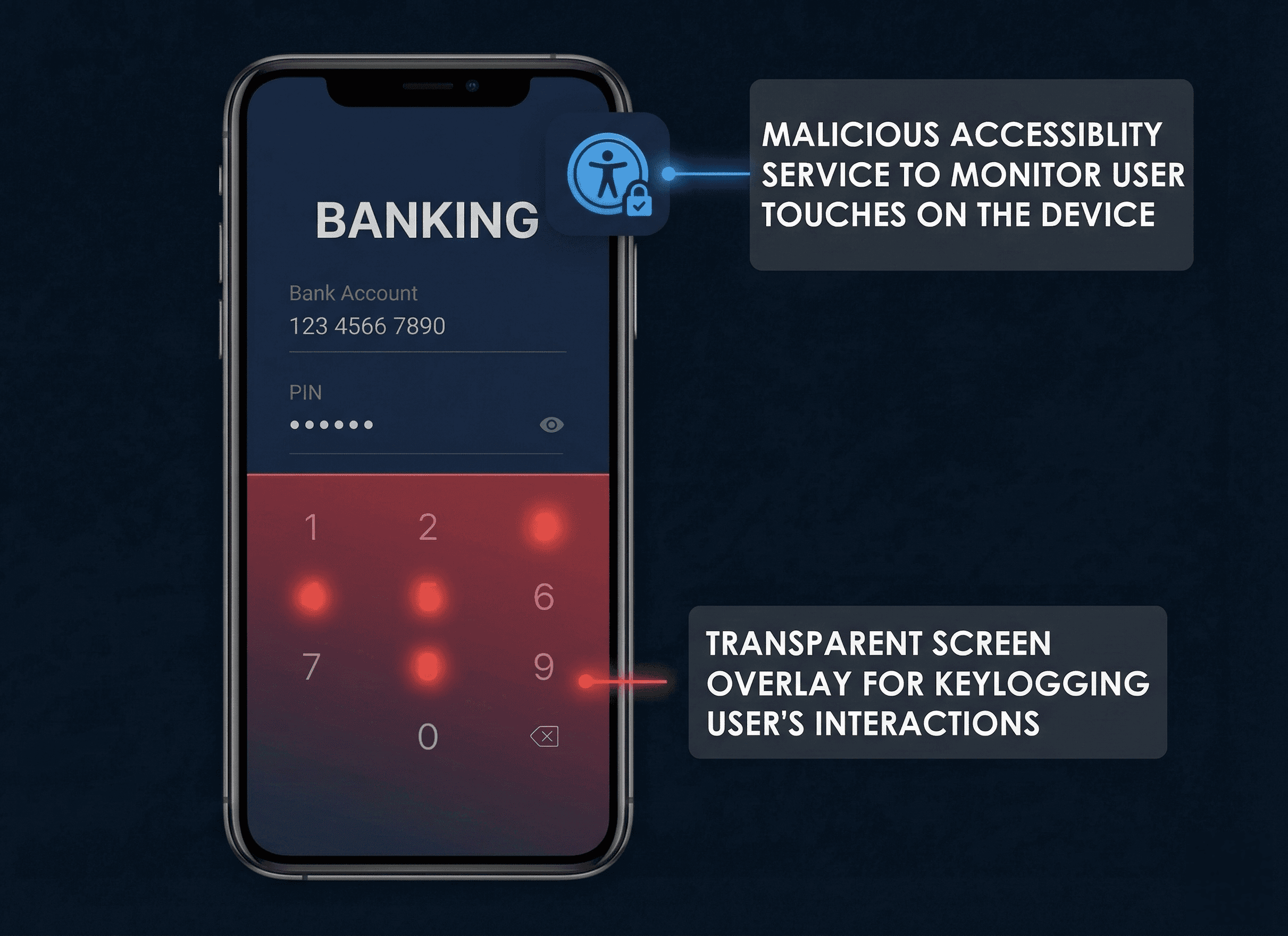
When a malware has this permission, it can abuse it in several harmful ways. It can draw windows over any app or hide parts of other apps, manipulating what the user sees on their screen.
It can also perform keylogging to record user taps, and use that capability to create fake login screens that trick users into entering their credentials. Furthermore, it can even prevent its own uninstallation, making it difficult for users to remove the malicious software from their device.
Accessibility Services
Android's accessibility framework helps users with disabilities and enhance the experience of users with disabilities.
Android's AccessibilityService API was built for screen readers and switch-access systems. A registered service receives AccessibilityEvent callbacks for every UI state change across the entire device, every screen that opens, every field that gains focus, every button tapped. It can also fire simulated touch events, click UI elements, navigate app hierarchies, and fill in forms, all programmatically and silently. Malware uses these features for automation and monitoring rather than helping disabled users.
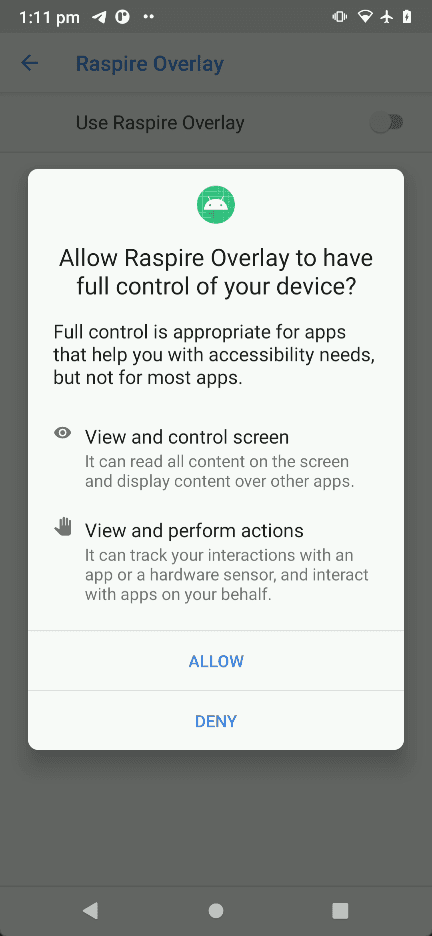
Android Accessibility Service permission dialog.
How the Attack Worked
To demonstrate the real-world consequences of granting such permissions, our R&D team simulated the attack in a controlled environment. In this simulation, the "HappyTransfer" application serves as the targeted victim, representing an example of real-world financial application, while the "RASPIRE Overlay" application emulates the behavior of a malicious actor exploiting granted permissions to execute unauthorized transactions.
Installation and Permissions
The malware requested overlay and accessibility permissions under the false pretense of enabling features like picture-in-picture mode for watching series or live sports. Trusting these seemingly legitimate explanations, users approved both permissions without hesitation.
What they didn't realize was that by doing so, they had unknowingly handed the malware complete control over their device's interface.
From that moment on, the app could silently observe every action taken on the screen, intercept sensitive information, and autonomously perform operations, all while the user remained completely unaware that anything suspicious was taking place.
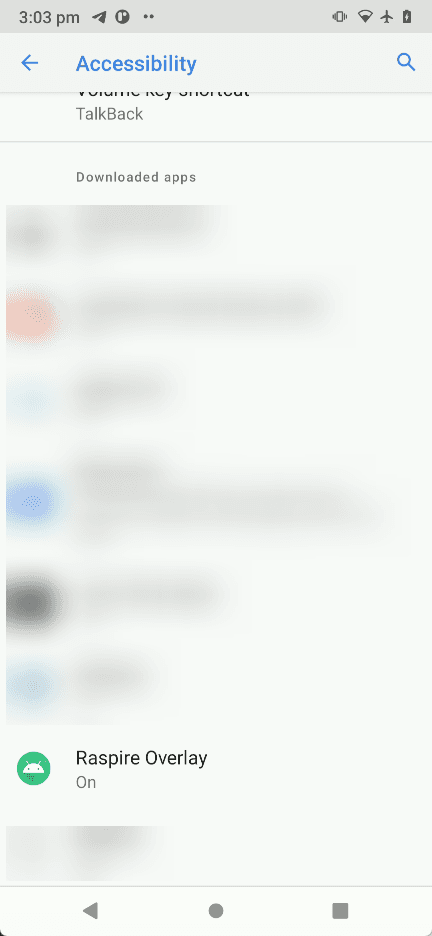
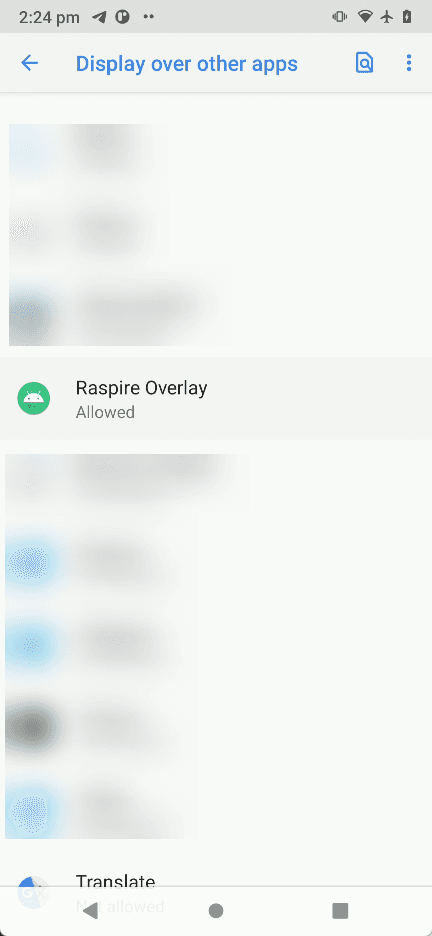
Our app asks for overlay and accessibility permission request.
Watching Everything You Do
Instead of taking screenshots, a specific type of Android malware leverages a UI-tree approach. It navigates AccessibilityWindowInfo roots and then recursively analyzes AccessibilityNodeInfo objects. This process allows the malware to build a structured representation of the Android user interface.
The representation includes visible text, content descriptions, class names of UI elements, screen coordinates, and interaction flags indicating whether elements are clickable, editable, focused, or enabled.
However some banking apps apply an attribute android:importantForAccessibility that identifies important UI elements for accessibility services. Use noHideDescendants to exclude a view and all its child views from accessibility services.
While this reduces direct node-level visibility, it is not enough to prevent abuse by advanced malware. Since it does not need to visually read the UI. It can already infer the interface structure of the target app and match it to the compromised device’s screen size.
Even after noHideDescendants removes a subtree from node children, the window itself is still exposed through accessibility metadata, including its bounds on the screen, title and type, and active or focused state.
So the malware ran in the background using accessibility services to detect when the user opened their banking app.
Fake Notification, Social Engineering and PIN Theft
The malware delivered a fake notification styled to look like an official bank notification, claiming an unauthorized transaction and prompting the user to verify their balance.
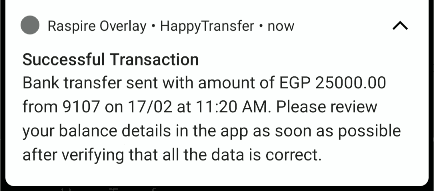
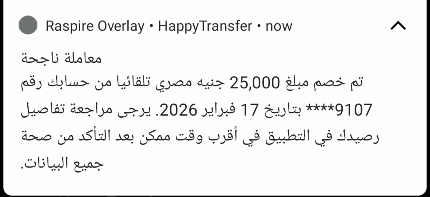
The malware pushed a fake notification.
When the user tapped the notification, the legitimate banking application opened. The user authenticates using the biometric authentication and immediately afterward, the malware deployed a transparent overlay to capture touch interactions and the user’s PIN entry. The user saw their actual banking app underneath, so everything looked normal.
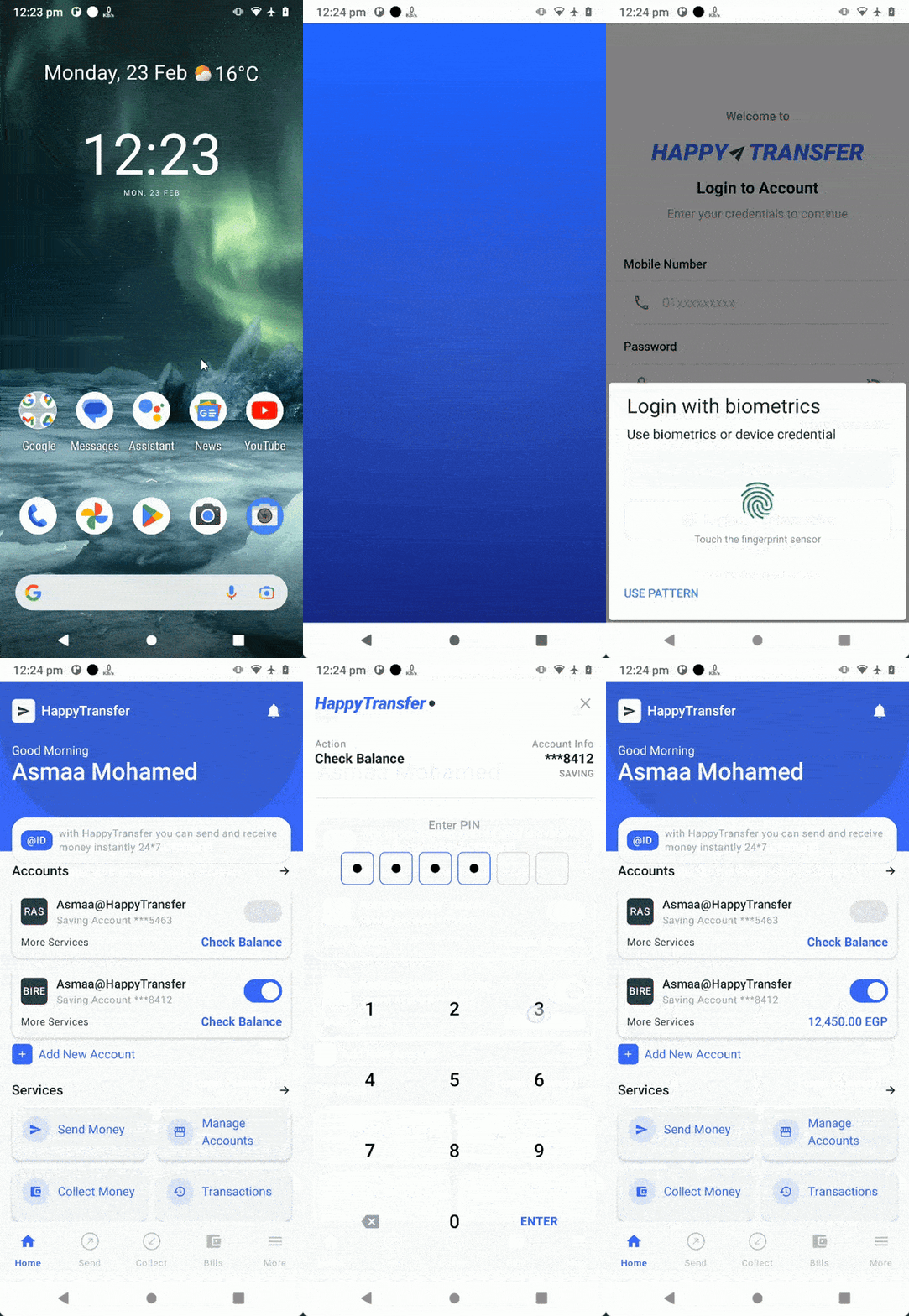
Full screen transparent overlay to capture sensitive Information (GIF).
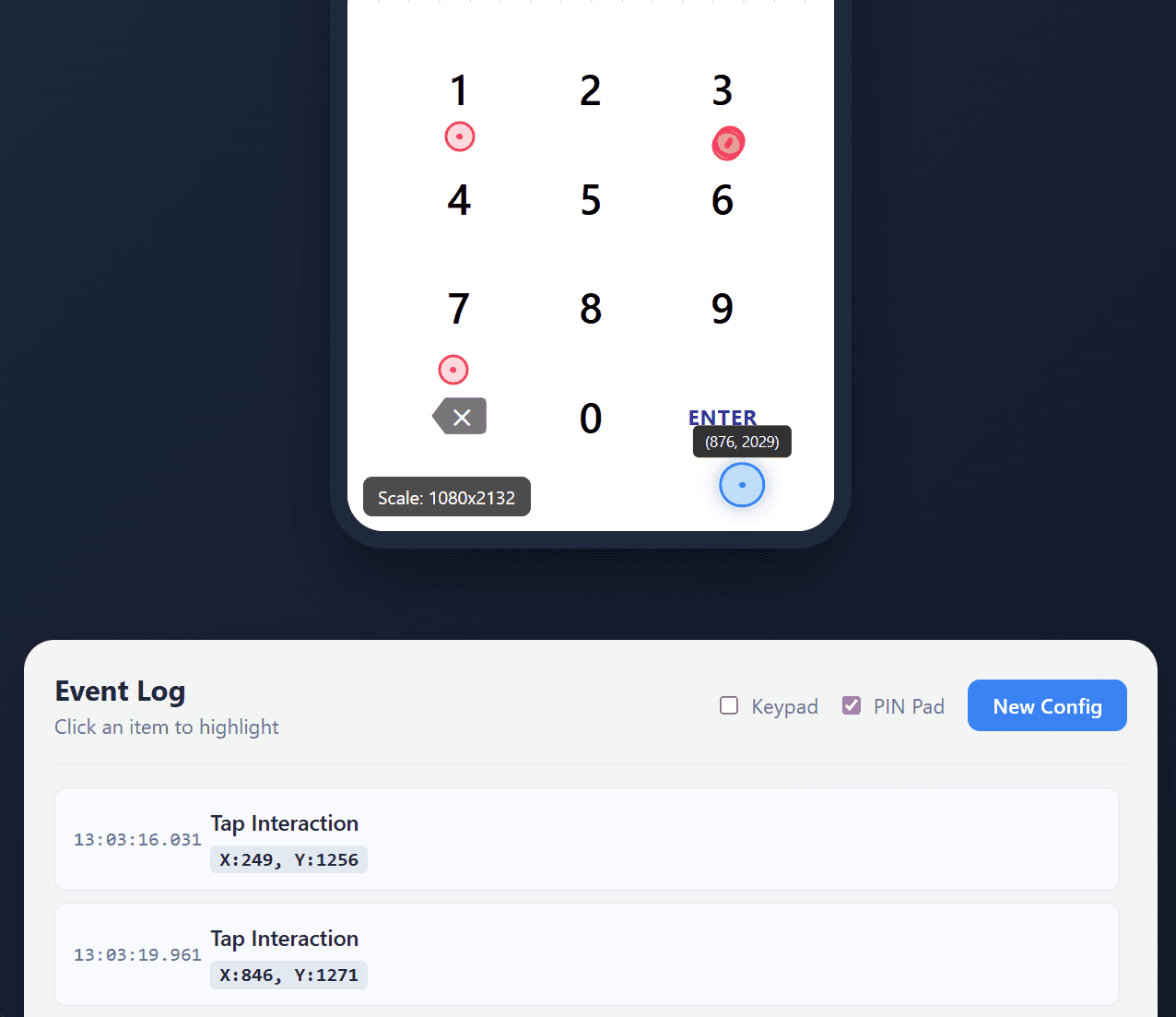
Operator’s point of view.
The operator reconstructs the victim’s touch sequence and maps tap locations to recover the PIN. As shown in the screenshot, the PIN is 133337, with the final tap on the bottom “Enter” button.
The Silent Heist
After capturing the victim’s PIN, the malware acts immediately and performs a blind ATS attack which is on-device fraud that automates money transfers without user interaction using accessibility services.
The malware first presents a full black-screen overlay to conceal malicious activity from the user and behind this visual cover, it leveraged accessibility services to navigate through the banking application, automatically perform ATS with the required transaction fields, supply beneficiary or phone number and transfer details, enter the previously stolen PIN when authentication was requested, and then finalized the fraudulent money transfer with minimal user awareness.
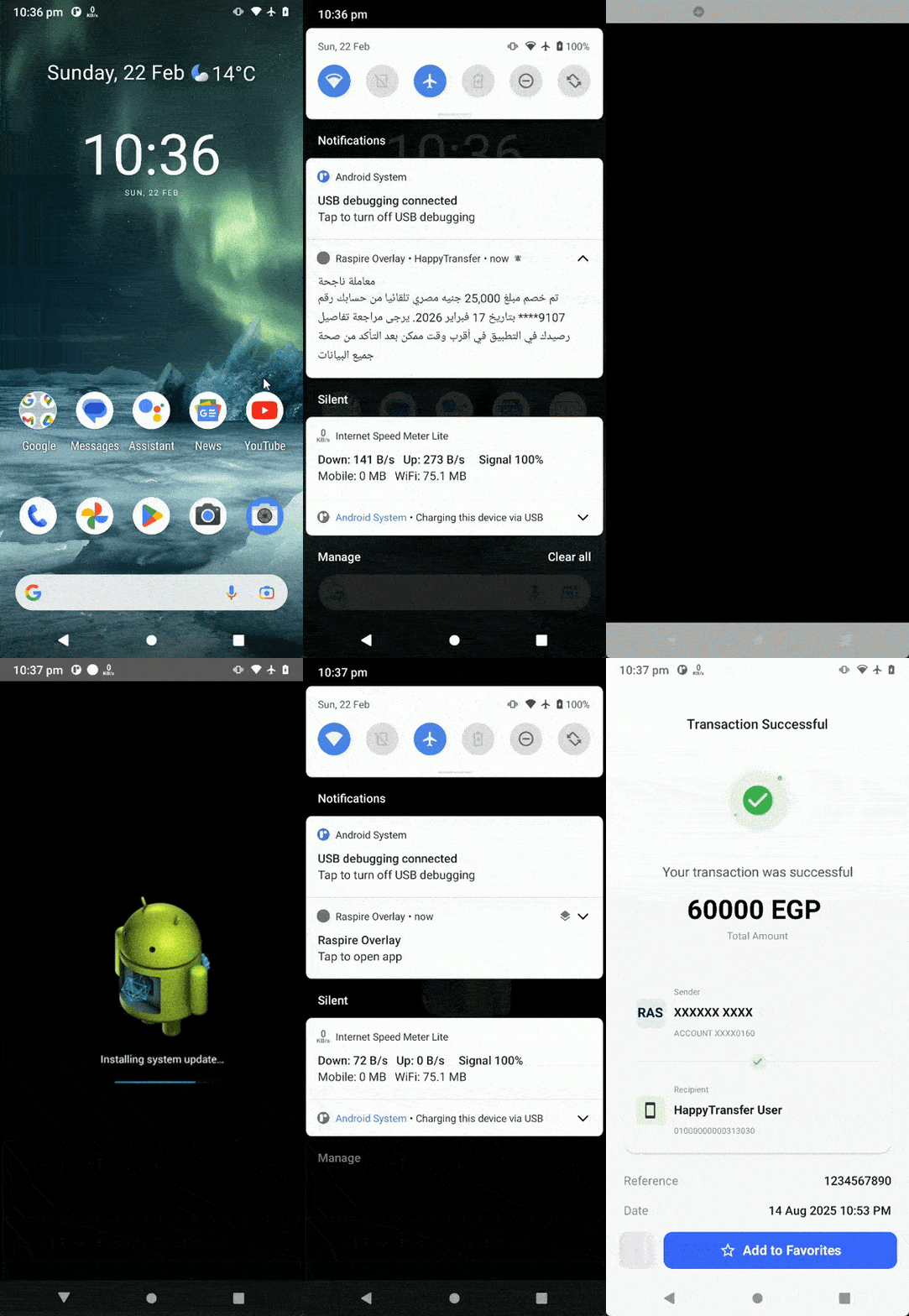
The rest of the attack sequence (GIF).
The entire process took less than 2 mins. Users only noticed later when checking their balance.
Mitigations
Prevent overlays on sensitive screens
Screens that handle logins, passwords, PINs, OTPs, and transaction approvals should be treated as high-risk areas. These flows should be protected so that other apps cannot place content over them while the user is interacting with them. If another application attempts to cover the app’s interface, the app should avoid processing user interactions. This helps prevent attackers from tricking users into tapping buttons they cannot clearly see.
Restrict accessibility services to whitelisted entries only
Limit which accessibility services are permitted to interact with your application by maintaining an explicit whitelist, blocking unauthorized or unrecognized services from gaining access.
Use biometrics and system dialogs
To prevent threat actors from exploiting accessibility services to silently authorize transactions, integrate biometric authentication as a mandatory requirement for all high-value or critical operations within your application. This ensures that even if a malicious service gains control of the UI, it cannot bypass user-present verification since the biometric authentication screen cannot be automated.
App Shielding
Implementing these defenses manually is possible, but it introduces significant engineering overhead and requires ongoing maintenance. App shielding solutions offer an alternative by applying these protections at the app level without requiring changes to your source code.
The attack demonstrated in this post, from fake notification to silent fund transfer took less than two minutes. Defending against it shouldn't take weeks of custom engineering. That's the problem RASPIRE was built to solve.
RASPIRE offers several layers of protection against this kind of attack.
Overlay detection: RASPIRE monitors for unauthorized windows drawn over the protected application in real time, detecting and blocking both fully opaque phishing screens and transparent overlays designed to silently intercept touch input, the exact technique used to steal the victim's PIN in this attack.
Accessibility service restriction: RASPIRE identifies and blocks unauthorized accessibility services from interacting with the protected app. This prevents malware from reading the UI tree, monitoring screen content, or injecting simulated taps to automate transactions effectively neutralizing the blind ATS attack described above.
Code hardening and integrity verification: Even if an attacker understands how the banking app works, obfuscation and anti-tampering checks make it significantly harder to reverse engineer the app's structure or modify its behavior at runtime.
Beyond these core layers, RASPIRE provides behavioral analysis to detect anomalous runtime patterns and integrates with existing security infrastructure, giving security teams visibility into active threats across their user base.
To learn more about how we approach overlay and accessibility abuse protection, or to see these defenses in action, talk with our team.
Written by

RASPIRE
R&D Team
Share this article
Share this post with your team or anyone who’d benefit from these insights.